Dosh: Chording Down to Eighteen Keys
This picks up directly from Taipo, which I wrote in early 2024. That post ended with a promise I hadn’t kept yet: that at some point I would have to decide Taipo was good enough to go cold turkey on QWERTY, and that I was revising my 30-key two-row keyboard toward exactly that. This is what happened when I finally did it. The short version is that it worked, that the layout I use is no longer quite Taipo, and that as of today it is genuinely my daily driver.
Summary
The story is easiest to follow as a sequence of shrinking key counts: 42 keys on the board I typed on for years, 30 when I removed QWERTY as an option, 20 when I rebuilt the board around where my hands actually want to be, 16 on a layout that turned out to be a step too far, and 18 on the one I’ve settled on.
That last layout is called Dosh. It is five days old. I named it on Thursday the 3rd, drilled it across a four-day weekend, and today is the first day it feels like it has caught up with where Taipo was — not in raw speed, but in the quality that actually matters to me, which is not having to think about it.
42 keys: the jolt3
For the past few years my daily driver has been the jolt3: a 42-key split with an ortho layout, column stagger, and vertically displaced rows. It supports several input modes, and in practice I spent nearly all of my typing in QWERTY, using steno only for drills.
Taipo was in there too, but not as a way of writing. I had incorporated it as the finger-spelling mechanism inside my steno mode, so I had a decent working knowledge of the basics — I just had never used it as an actual input method.
30 keys: cold turkey
On August 1st I concluded that this was the whole problem. If I wanted to get better at Taipo, I needed a setup where I couldn’t fall back to QWERTY the moment I had something real to type. Wanting to improve was never going to beat the path of least resistance, so the answer was to remove the path.
I switched to an older two-row 30-key board, which has no practical QWERTY mode at all. I have avoided QWERTY entirely on my main computer since then — the only exception is a gaming PC, where I use it to log in and type basic searches.
I also made a revision of that board, the mesa1, for two reasons that had nothing to do with typing: the original was designed in Eagle, which I no longer have access to, and the existing builds used older “clack” switches. Around the same time I started noticing forearm pain, which turns into its own thread further down.
After a few weeks of awkward typing, something changed that I hadn’t expected. The cognitive burden of the typing itself dropped away, and Taipo started to feel natural. I have not reached the ~100 WPM I can manage in QWERTY and may never. What I learned is that the automatic quality matters much more to me than the number does.
The part that was actually gating: giving up steno
All through this I was working from an assumption I had never examined — that I was setting steno aside temporarily while I learned Taipo, and would come back to it.
After a lot of reflection, I concluded I’m not coming back. Steno is designed for transcribing spoken language, which I don’t do; it is mainly phonetic, so much of the learning difficulty is resolving the ambiguity that causes; it isn’t closed, so every new word or name means a new dictionary entry and the dictionary becomes a lifelong maintenance task; and it isn’t actually optimized for comfort, since the target is input speed. That last one shows up directly in the fingering: the right pinky is responsible for four keys and the left for one. That argument deserves more room than it gets here, and I intend to write it up properly on its own.
What matters for this post is what the decision freed up. As long as steno was the goal, the outer pinky column had to exist and had to be reachable, because steno needs it. Every board and every layout below this point drops that column. I could not see any of what follows as the place to put my attention until I stopped optimizing for an input method I had decided not to use.
20 keys: the mesa2
The forearm pain kept getting worse, so on August 28th I went back to the three-row jolt with the firmware rebuilt as Taipo-only. That was better for my arms, but it pushed a different problem to the front.
The jolt’s whole answer to ergonomics is elevation: the rows sit at varying heights, built up on key risers. It works, and it is also more keyboard than I want to own. Assembling all of those risers is slow enough that it discourages experimenting with anything else on the board, and it doesn’t travel well — I have had it come back from a trip with something no longer working more than once. None of that has anything to do with typing on it, and nothing to do with Taipo; it’s purely that the construction is fragile and tedious. What it convinced me of is that I wanted an answer to the ergonomics that didn’t involve getting the keys up into three dimensions in the first place.
Tenting was the other thing I tried, and it was a separate line of attack: not a fix for the elevated board, but an attempt to make a flat one comfortable by angling it. It does help with some of the strain, but it means holding the hand up instead of resting it, and in the end that just traded one set of sore muscles and tendons for another.
So I stopped theorizing and got some graph paper. I rested my hands on it and marked where my fingers most easily moved. The useful discovery was about the pinky: it prefers to abduct — to swing sideways — because extension on its own doesn’t cover the distance between two keys comfortably.
That produced the mesa2. It’s a unibody board, 20 keys, with the geometry generated from a script rather than nudged by hand. The number that came out of the graph paper is the pinky column’s angle: 57.9°, against −2.5° for the ring, −12.2° for the middle and −37.0° for the index. The pinky isn’t merely splayed a bit more than its neighbors; it’s set almost perpendicular to them, because it is swinging sideways rather than reaching forward.
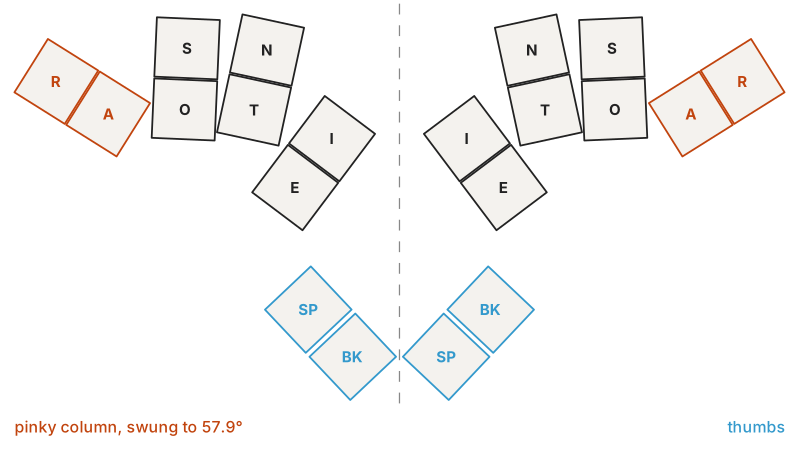
The mesa2, 20 keys. The pinky column (R and A) is set at 57.9°, nearly perpendicular to the index column’s −37.0°. That angle came off the graph paper, not out of a theory.
This is easily the most comfortable layout I have used. Its one real flaw is that being unibody fixes the angle between the halves, which in turn fixes the board to essentially one position on my desk.
16 keys: Posh, and why it didn’t take
The mesa2 rotated the pinky keys so I could abduct into them instead of reaching, and that helped, but it was still an awkward movement. So I looked at getting rid of the pinky altogether.
There is a layout for this. Posh is a Taipo-style layout from the same community, described there as “a taipo style layout that excludes the pinkies in order to make combos more accurate and long periods of work more comfortable.” I added it to my firmware as a Taipo variant on August 22nd and ran it as my only layout for twelve days, tuning it as I went.
It didn’t take. Dropping two keys per hand means the remaining chords have to get larger to cover the same alphabet, and the result was different enough from Taipo that I wasn’t relearning a couple of letters — I was relearning the alphabet. Twelve days in, I was still hesitating on letters I had known automatically a month earlier.
The other thing twelve days taught me is that my diagnosis had been wrong. I am perfectly happy with the pinky on the lower row. What hurts is reaching up to the upper one.
18 keys: Dosh
On September 3rd at 10:16 in the morning I renamed my Posh variant to Dosh, and eight minutes later committed the change that defines it: bring back the lower pinky, and Taipo’s letters with it.
Dosh keeps the lower pinky key and drops only the upper one. What that key buys is not primarily more chords — it’s agreement with Taipo. Every letter that Taipo types without its upper pinky sits on exactly the chord Taipo has it on. Nineteen of the twenty-six letters are shared, and only seven have to be learned twice — and six of those seven are forced, because Taipo puts them on the upper pinky where Dosh simply cannot reach them. Only v had a real choice behind it.
Where it doesn’t conflict with that, Dosh does prefer the smaller chord; that’s why the punctuation and digits mostly follow Posh, which had already worked out how to lay them out on a hand this size. The modifiers are Taipo’s, on the same-finger vertical pairs. The full cheat sheet is DOSH.md in my firmware repo, which is the reference for all of this; the implementation is one file.
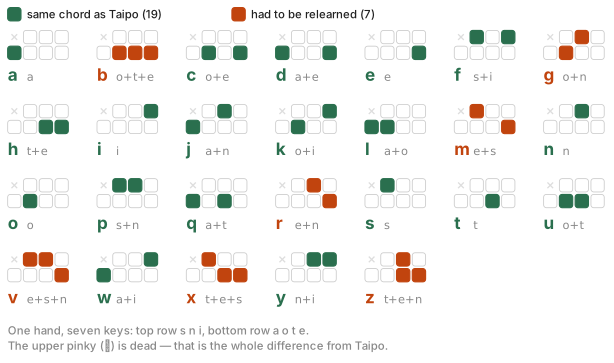
The whole Dosh alphabet. Nineteen letters sit on exactly the chord Taipo uses; only the seven in orange had to be learned twice, and six of those had no choice about it.
Measuring instead of guessing
The reason Dosh came together in a morning is that by then I had something telling me where the problems were.
On August 30th, four days before Dosh existed, I used Claude Code to build a native Mac app that teaches and drills me on this kind of typing. It reads a back channel on my keyboard, so rather than seeing keystrokes after the fact it captures the exact timing of each chord, and — importantly — what I type immediately after a backspace. That second signal is what tells you which chords you are getting wrong, as opposed to merely slowly.
It was built for Posh, and its measurements are a large part of why Dosh looks the way it does. The clearest case is the apostrophe. In Posh it lived on h’s both-thumbs layer: two fingers and both thumbs, for one of the commonest marks in English. It measured accordingly — 1330 ms, with a fifth of its uses taken back by backspace, against roughly 300 ms and a twentieth for the ordinary letters around it. I moved it to a bare chord of its own at 22:55 that same evening.
I would not have found that by introspection. It felt awkward, but so did everything at that point, and “everything feels awkward” is not actionable. The number was.
Getting back to Taipo
Because Dosh and Taipo run on the same engine and differ only in the chord table, the firmware can switch between them. On boards with a spare key, a solo tap of the lower-left key — the steno # key, which Taipo doesn’t use — swaps tables. On the 20-key boards there is no spare key, so two chords do the job instead: the whole top row selects Taipo, the whole bottom row selects Dosh. They select rather than toggle, so you always know where you land.
18 keys: the mesa3
The mesa2’s geometry was right and its shape was wrong, so the mesa3 is that geometry cut in two. I started it on September 6th as two copies of the mesa2 and split them into halves; it went to fab this week.
Nine keys per side, eighteen in total — the board and the layout finally agree on the number, and the outer pinky column that steno required is simply not there.
The halves are fully symmetric, which is the property that makes this worth doing. Chords are formed within one hand, so with identical hands I can alternate freely — including for double letters, which is the case that usually breaks chorded input. That’s what gives a chorded layout a path to approaching, and possibly passing, the speed I used to get out of QWERTY.
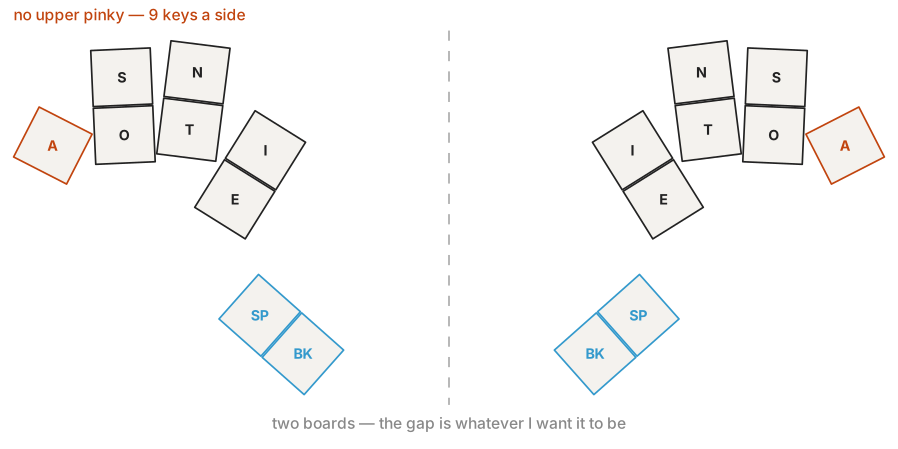
The mesa3: the mesa2’s geometry cut in two, with the upper pinky gone. One pinky key per side, rotated so the cap follows the direction the finger actually swings.
Design files for all of these are in my keyboard designs repo: mesa2, mesa3. The geometry is generated by script rather than dragged around in the editor, so the numbers in those directories are the real ones.
Where this stands
Dosh is five days old today. It was named on a Thursday morning, drilled across the four-day weekend that followed, and this is the first day I would say it has caught up with the comfort I had built up with Taipo.
That’s a strange thing to be able to say about a layout that didn’t exist a week ago, and I think the explanation is the nineteen shared letters. I wasn’t learning a layout. I was learning seven letters and some punctuation, on top of a month of muscle memory that transferred intact. Choosing compatibility over elegance is the entire reason this was a weekend rather than another twelve days of hesitation.
The thing I keep coming back to, though, is that none of this was available to me while I was still holding a place for steno. Two and a half years ago I framed Taipo as the thing I’d use for text that wasn’t English prose, with steno as the real target. Getting here required admitting that the real target was wrong.